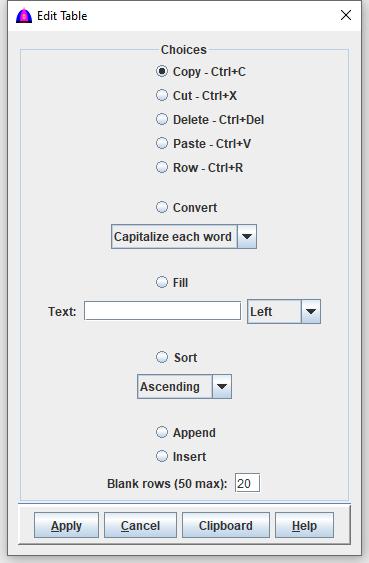
| Radio Button | Function |
|---|---|
| Copy – Ctrl+C | Copy text from selected rows and columns to the clipboard. Rows and columns are compacted together even if they contain skipped cells. |
| Cut – Ctrl+X | Cut text from selected rows and columns to the clipboard, compacting skipped rows and columns. |
| Delete – Ctrl+Del | Delete all selected rows across all columns, even if only one column is selected. |
| Paste – Ctrl+V |
Paste clipboard text starting at the highlighted cell. Note: Text may be clipped if the clipboard contains more columns than the remaining columns to the right of the highlighted cell. |
| Row – Ctrl+R | Insert a new row before the highlighted row. |
|
Convert |
Convert text in selected rows and columns using the chosen option:
|
|
Fill Text: |
Fill selected rows and columns using the text entered in the Text field:
|
|
Sort |
Sort the selected rows based on the first selected column,
using the chosen order (ascending or descending). To sort the entire table by clicking on a column header, check the Sort checkbox on the toolbar. |
| Append | Append blank rows to the end of the table using the number specified in Blank rows (50 max). |
| Insert |
Insert blank rows before the highlighted row.
The number of rows is based on the Blank rows (50 max) value. Shortcut: Ctrl+R inserts a blank row before the highlighted row. |